SimCity BuildIt
- 4.1
- Rating
- 100.00M
- Installs
- Free
- Price

 Analysis by App-foxy
I approached SimCity BuildIt as a decision rather than a quick download: does this city-building simulation suit the way you actually like to play, or would another type of mobile game be a better match? After spending time laying out districts, balancing services, and waiting for production to finish, my answer is fairly clear. This is a polished choice for players who enjoy gradual progress and planning around limited space, but it is less satisfying if you want instant construction, deep creative freedom from the first minute, or a game that never asks you to wait.
Developed by ELECTRONIC ARTS, it puts the focus on creating and managing a growing metropolis on a phone or tablet. The basic download is free, and the game is rated Everyone 10+, although optional purchases range from $0.99 to $99.99 per item. That combination matters: you can begin without paying, but the design regularly encourages you to think about time, resources, and whether speeding something up is worth the cost.
What to consider before choosing this city builder
The first decision is about your preferred pace. This is not a traditional desktop-style city simulator compressed onto a small screen. It is built around short visits, repeated production tasks, upgrades, and a city that develops over time. I found it easy to open the game for a few minutes, collect finished goods, start another production cycle, and leave. It also works for longer sessions when I wanted to rearrange roads or improve the appearance of a district.
In-Depth Coverage of SimCity BuildIt
The second decision is whether you enjoy managing several connected needs at once. A new building is rarely just a decoration. Expanding a neighborhood affects demand for services, available space, traffic planning, storage, and the flow of materials. I liked that every improvement created another practical question. The trade-off is that the city can feel less like a blank canvas and more like a puzzle whose rules gradually become stricter.
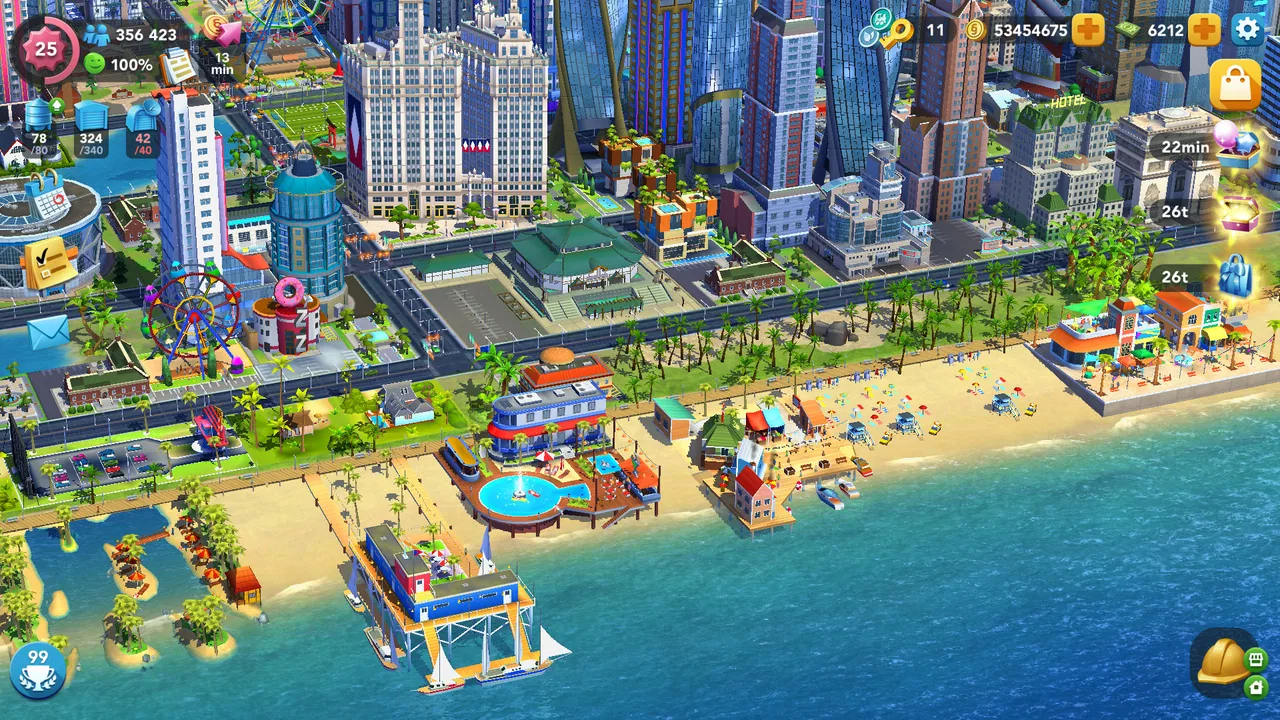
For me, the strongest reason to try it is the combination of visual progress and light resource management. You can see a settlement become more developed instead of simply watching numbers rise on a menu. The weakest reason is impatience. If waiting for production or collecting enough materials feels like a chore, the central rhythm will probably wear you down.
The game has a 4.2 average from around 5.6 million ratings, with roughly 190,000 written reviews and over 100 million installs. Those figures show that it has reached a very broad audience, but popularity should not be confused with a perfect fit. A large player base tells me the format is accessible; it does not remove the need to consider the timer-driven structure and optional spending.
The first hours teach the right lessons
The opening is approachable because it gives you a clear sense of cause and effect. You place residential buildings, provide the basics they need, and watch the population respond. Rather than dropping you into a complicated spreadsheet, the game introduces systems through visible changes in the city. I appreciated this because it makes the early decisions understandable even if you have never played a simulation before.
My advice is not to fill every available space immediately. Early enthusiasm can lead to a crowded layout that becomes awkward when larger roads, services, or future buildings need room. Leaving a few flexible areas is more valuable than making the first neighborhood look complete. This is one of the less obvious lessons: a tidy early grid is not always a useful long-term plan.
I also recommend treating production slots as a schedule instead of a button you press whenever you remember. Before leaving the game, I try to start items that will be useful later rather than making whatever is currently available. That small habit reduces empty time and makes the next visit more productive. It also changes the game from random tapping into a simple routine.
Why the planning feels satisfying
The most enjoyable part is the relationship between layout and development. Roads are not merely visual lines, and buildings are not isolated objects. A decision in one neighborhood can influence how practical the surrounding area becomes. I often found myself postponing a tempting upgrade because I wanted to reserve space for a better arrangement later.
This creates a useful tension between short-term rewards and long-term design. Spending resources on immediate improvement can make the city look better now, while saving them may prevent a frustrating bottleneck later. The game does not require expert knowledge to understand this, but it rewards players who pause before accepting every available upgrade.
Another tip is to judge a building by its effect on the surrounding pattern, not only by its individual appearance. A visually attractive placement may force awkward roads or leave an inefficient gap. I eventually became more comfortable moving things around and accepting that a city can look temporarily untidy while I test a better structure. That willingness to revise is more important here than trying to make every first placement permanent.
Short sessions, longer projects
In an everyday scenario, I can imagine opening the game during a commute or while waiting for an appointment. I collect finished materials, begin a few new production jobs, check whether a residential improvement is ready, and close it again. Later, when I have more time, I return to the larger task of reorganizing roads and districts. That split between maintenance and planning suits mobile play well.
However, the same structure can feel repetitive. A short session often consists of collecting, starting production, checking storage, and deciding whether to wait. The city may look active, but the deeper work is frequently spread across many small visits. Players who prefer one substantial challenge per session may find this less compelling than a focused puzzle or a conventional strategy game.
The game is also more comfortable for people who enjoy visible incremental progress than for those who want a decisive ending. I never feel that the city is truly finished; there is always another improvement, another space problem, or another reason to revisit the layout. That open-ended quality is motivating for some players and tiring for others.
You May Also Like

 8 Ball Pool
8 Ball Pool Is Built on Rivalries, Rematches, and Routine
A close look at the rivalries, rematches, shared routines, and unanswered safety questions that turn a quick pool match into a persistent mobile community.

 Samsung Music
Samsung Music’s Quiet Strength Is Playing What You Already Own
Its reach comes less from spectacle than from dependable access to a personal library. That simplicity is both the app’s strongest retention engine and its ceiling.

 AccuWeather: Weather Radar
AccuWeather Review: A Quick, Clear Forecast for Everyday Decisions
For everyday plans, the best forecast is the one you can understand quickly. AccuWeather makes rain timing, radar, and local conditions easy to act on, with a few trade-offs.

 Hill Climb Racing
Why Hill Climb Racing Still Turns Crashes Into One More Run
A tiny car, a bumpy hill and one more upgrade: Hill Climb Racing keeps resurfacing because its simple chaos makes every near-miss feel personal.

 AliExpress - Shopping App
AliExpress Makes Global Shopping Feel Personal, but Shoppers Bear the Risk
AliExpress turns a global marketplace into a pocket-sized discovery engine. Its reach is useful, its shopping loop compelling, and its trade-offs easy to miss.

 Lords Mobile: Kingdom Wars
Lords Mobile Is a Kingdom-Building Routine, Not a Quick Match
A case-by-case verdict on the building, battles, device demands, and social commitments that make Lords Mobile rewarding for some players and exhausting for others.
More From Our News Desk



Where this game wins, and where another option may fit better
I use this section to weigh the game’s practical strengths against the kinds of city builders that may suit you better. Its appeal comes from balancing accessible planning with a city that needs ongoing attention, so I’d choose it when that recurring routine sounds enjoyable—not merely because it is familiar or popular. The next section looks at how that balance holds up once the first rush of building wears off.
A strong middle ground between decoration and management
Compared with a purely decorative building game, this one gives placement more consequence. I cannot simply arrange attractive structures without thinking about how the city functions. That makes the result feel earned. When a neighborhood finally works after several adjustments, the satisfaction comes from solving a small planning problem rather than only choosing a pleasing color or shape.
Compared with a highly technical city simulator, it is easier to understand and better suited to touch controls. I do not need to study a complex manual before making progress. The game communicates a lot through the city itself: a developing area looks different from an established one, and a poor layout becomes apparent through the pressure on available space and resources.
That middle position is its main strength. It offers more decisions than a simple idle builder while avoiding the intimidating density of a full simulation intended for a larger screen. I would recommend it to someone who wants a city to manage but does not want every session to become an engineering exercise.
The limitations become clearer over time
The free-to-play structure is the most important friction point. The game lets you start without an entry fee, but the presence of optional purchases affects how I evaluate its pacing. When progress slows, the question is not only “what should I build next?” but also “am I willing to wait, reorganize, or spend?” I prefer the first two answers, yet players who dislike monetized time pressure should approach carefully.
Storage and space create another kind of friction. A productive city depends on keeping materials moving, but limited room can make every decision feel cramped. This is not necessarily a flaw; the restriction is part of the challenge. Still, it means that casual collecting without a plan can produce clutter and make the next upgrade harder to manage.
The game is not the best choice for someone seeking unrestricted creativity. Its systems place practical limits on what can be built and where it can go. If your main goal is designing a beautiful scene without worrying about supply chains, services, or gradual unlocks, a dedicated creative builder may be more relaxing.
It may also disappoint players looking for a competitive strategy experience with fast, dramatic turns. The emphasis here is on developing a personal city through repeated decisions. The tension is gradual rather than explosive. I found that calming, but someone who wants immediate conflict or constant tactical surprises may prefer a different category entirely.
How to decide whether switching is worthwhile
If you already play another city builder, switching is not cost-free in terms of attention. You will need to learn a new layout logic, adjust to its production rhythm, and accept that early progress may feel slower than the mature city you already understand. I would switch when the current game has become too technical, too visually limited, or too demanding for the short sessions I usually have.
I would not switch simply because this title is popular. The better question is what currently frustrates you. If you want more accessible city management and enjoy returning to a project repeatedly, this game is a sensible move. If your complaint is that your current builder already relies too heavily on timers or resource bottlenecks, changing to this one may reproduce the same problem in a different presentation.
For a player coming from a decorative builder, the adjustment is mainly learning to plan before placing. For someone coming from a deep simulation, the adjustment is accepting a lighter model with fewer technical layers. In both cases, I would give the game a fair trial by building slowly instead of rushing to make the city look large.
Practical questions I would ask before installing
Can you play without paying? Yes, the game is free to download and begin playing. My recommendation is to decide your spending boundary before you start, rather than making that decision when a timer or resource shortage becomes irritating. The optional purchases are part of the experience, so patience is a useful resource even when your real-money budget is zero.
Is it suitable for younger players? Its content rating is Everyone 10+, which makes it broadly accessible, but the purchase system is still worth discussing on a shared device. I would make sure the person using it understands that optional items cost real money. The age label does not change the need for sensible purchase controls.
Does it work for occasional players? Yes, its production-and-collection rhythm supports brief visits. The important distinction is that occasional play will usually mean slower development. That is fine if you enjoy a long project, but frustrating if you expect to unlock and upgrade everything quickly.
Will it run on an older device? The listed minimum operating system is Android 7.0, so Android users should check that their device meets that requirement before trying to install it. The current version is 1.74.2.150717. I would also leave room for the game to update normally, since a city-building title with several connected systems is not something I would want to maintain through an outdated installation.
Is it better than every alternative? No. It is better for players who want approachable management, a visible city, and progress that can be handled in short sessions. A more creative builder is a better fit for unrestricted design, while a deeper simulator may suit someone who wants detailed economic or infrastructure modeling. The right comparison is not which game is universally superior, but which kind of decision-making you want to repeat.
Small habits that make the experience better
My most useful habit is to separate “maintenance” from “design.” I collect materials and start production during short visits, then save road changes and neighborhood rearrangements for a calmer session. Mixing both tasks every time makes the game feel busier than it needs to be and encourages rushed placements.
I also avoid upgrading simply because an option is glowing or available. Before committing, I look at storage, nearby space, and the likely effect on the next few decisions. This prevents the common mistake of improving one building while creating a larger problem across the district.
A third habit is to keep a deliberately imperfect area. I use it as a testing ground for a different road pattern or a future expansion instead of treating every open tile as wasted space. That buffer makes the city easier to revise and reduces the pressure to dismantle a neighborhood whenever the plan changes.
Finally, I measure progress by how smoothly the city operates, not only by how many buildings I have placed. A smaller, organized district is more enjoyable than a larger one that leaves me constantly fighting storage and awkward routes. This mindset makes the slower sections feel like planning rather than punishment.
My recommendation after weighing the trade-offs
I recommend this simulation to players who like building a city in stages, making practical layout choices, and returning to the same project throughout the day. It is especially appealing if you want something more involved than a decorative builder but less demanding than a highly technical simulation. The free entry makes it easy to test that rhythm for yourself, provided you are comfortable with optional purchases being present.
I would skip it if you dislike timers, resource management, rearranging a city after an early mistake, or the possibility of paying to accelerate progress. I would also point creative-first players toward a builder with fewer functional restrictions. Those are not minor details; they shape nearly every session after the initial tutorial period.
For me, the deciding strength is the way the city turns small choices into a continuing project. I can make progress in a few minutes, but I can also spend a longer session thinking about roads, space, and the next stage of development. The experience is not frictionless, and its monetized pacing will not suit everyone, yet the underlying city-building loop remains approachable and rewarding.
With its Everyone 10+ rating, broad device accessibility from Android 7.0 onward, and a long-running presence since its release on Dec 15, 2014, it is an established option rather than a risky experiment. I would start it with modest expectations, protect a little empty space, and resist rushing upgrades. If that sounds like the kind of slow, hands-on project you enjoy, SimCity BuildIt is worth trying. If you want immediate freedom or a completely pressure-free builder, your time will likely be better spent elsewhere.
FAQs for SimCity BuildIt
01What is SimCity BuildIt and how does it differ from other city-building games?
SimCity BuildIt is a mobile city-building game that allows players to create and manage their own thriving metropolis. Unlike traditional desktop SimCity games, BuildIt is designed specifically for mobile platforms, offering touch controls and microtransactions. The game emphasizes real-time resource management and social interactions, making it ideal for on-the-go play.
02Is SimCity BuildIt free to play, and are there in-app purchases?
SimCity BuildIt is free to download and play on both Android and iOS. However, it includes in-app purchases that allow players to buy SimCash and other resources to expedite construction and development. While it’s possible to play without spending money, progress can be slower without these purchases.
03What are the system requirements for SimCity BuildIt on mobile devices?
The game requires a stable internet connection and a device running Android 4.1 or iOS 9.0 and up. While it can run on many devices, newer models with higher processing power will provide a smoother and more enjoyable experience, especially during large city developments and detailed animations.
04How does the multiplayer aspect of SimCity BuildIt work?
SimCity BuildIt includes a multiplayer component where players can join clubs to trade resources and participate in Club Wars, competing against other player groups. This social aspect adds a competitive edge and encourages collaboration, making it more engaging than single-player modes.
05Are there any strategies for managing resources effectively in SimCity BuildIt?
Efficient resource management in SimCity BuildIt involves balancing production facilities and storage capacities. Players should prioritize upgrading factories and keeping production queues full. Engaging in trading through the Global Trade HQ can help acquire necessary items and sell surplus, ensuring steady progress in city development.
Pros
- Stunning graphics enhance city-building experience.
- Engaging gameplay with numerous challenges.
- Frequent updates with new content and features.
- Realistic city management with various elements.
- Social features allow for trading with friends.
Cons
- Requires constant internet connection.
- In-app purchases can become expensive.
- Progression can be slow without spending.
- Limited offline play options available.
- Some features locked behind paywalls.

SimCity BuildIt
Gallery